
Managing Sitemap Options
Overview
Managing Sitemap Options enables administrators to control page indexing by search engines through sitemap inclusion and update frequency settings. This feature ensures accurate and efficient crawling, supporting enterprise SEO strategies for large-scale storefronts.
Step 1: Access Sitemap Settings
In the Page Details view (accessible via Content > Pages > page name or Edit), locate the sitemap configuration options, typically within the same form as SEO settings or a dedicated Sitemap section.
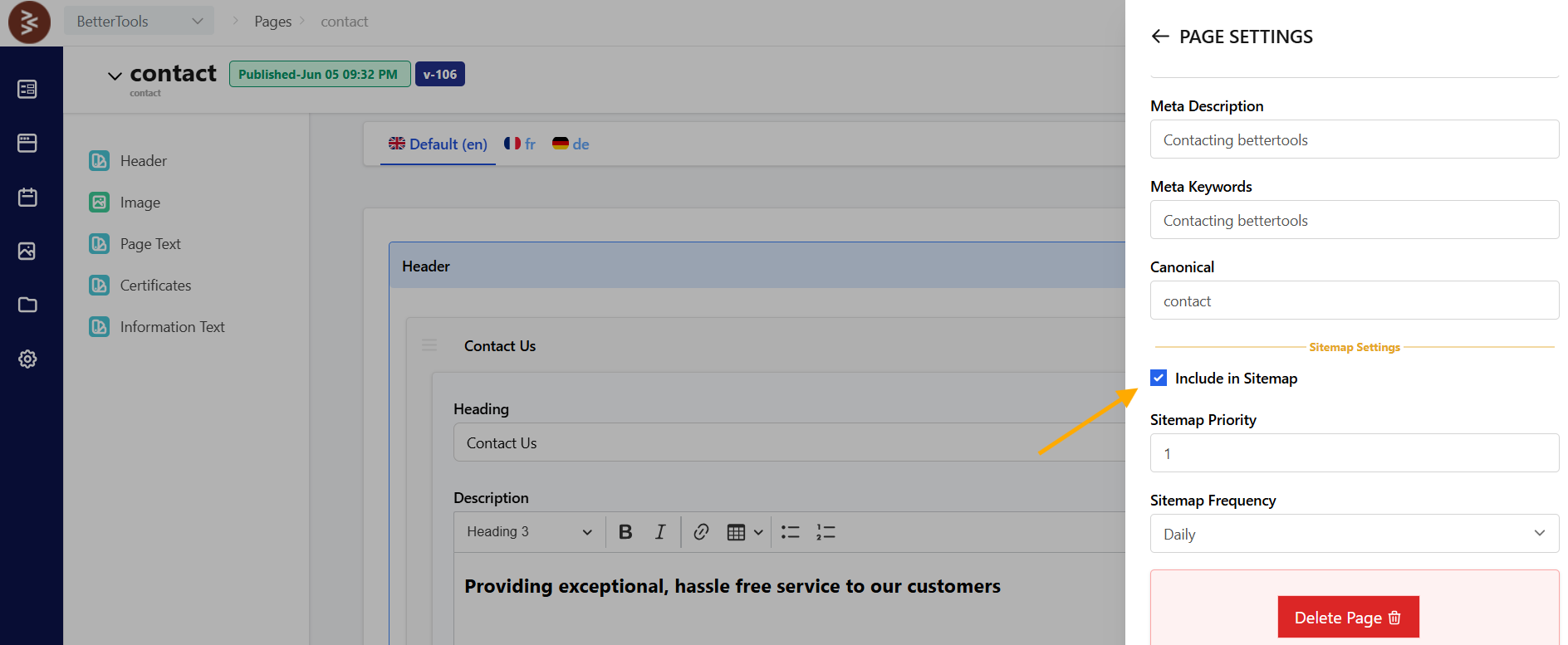
Step 2: Configure Sitemap Inclusion
Enable the Include in Sitemap option by toggling a checkbox or selecting a dropdown value to allow search engines to index the page. Disabling this option excludes the page from the sitemap, preventing indexing.
Step 3: Set Update Frequency
Select an Update Frequency from a dropdown (e.g., Hourly, Daily, Weekly, Monthly) to indicate how often the page content changes, guiding search engine crawl schedules. For example, choose "Daily" for frequently updated product pages or "Weekly" for static content.
Step 4: Save Settings
Click Save to apply the sitemap settings. The page’s sitemap inclusion and update frequency are updated, enhancing search engine crawling efficiency and indexing accuracy.
Best Practices
- Include only relevant, public-facing pages in the sitemap to optimize crawl budgets.
- Set appropriate Update Frequencies based on content volatility (e.g., Hourly for dynamic pages).
- Exclude sensitive or temporary pages (e.g., employee training pages) from the sitemap.
- Regularly review sitemap settings to reflect content strategy changes.
- Use analytics to monitor crawl frequency and indexing status.